

Alt text for images SEO is the short HTML description attached to every photo on your site, and it tells Google and screen readers what that photo actually shows. For Alberta trades and industrial businesses with image-heavy sites, missing alt text means lost traffic from buyers already searching Google Images for your exact services. This guide covers how to write alt text that works and how to roll it out across your whole site.
Your website might be full of great project photos, yet still invisible to the people searching for exactly what those photos show. That’s the hidden cost of skipping alt text for images SEO, a small piece of HTML code that tells search engines and screen readers what’s actually in a picture. For Alberta trades, construction, and industrial companies with image-heavy sites, this gap often means missed traffic from buyers who are already searching Google Images for your exact services.
This article breaks down what alt text is, why it carries real SEO weight, and how to write it properly for different image types, from project photos to infographics. You’ll also get a practical workflow for keeping alt text consistent as your image library grows. Cutting Edge Digital Marketing works with Alberta service and industrial businesses on exactly this kind of technical SEO detail, so the guidance here reflects what actually moves the needle for these industries.
Let’s get into the details that turn overlooked images into another lead source. If you want a partner to handle this for you, contact us to see how a full image and SEO audit could work for your site.
Key Takeaways
Alt text helps both search engines and screen readers understand what an image shows, making it a dual accessibility and SEO tool.
Keep alt text short, specific, and naturally worded. Never stuff it with repeated keywords.
Product shots, team photos, infographics, and maps all need a slightly different alt text approach.
Alt text works best paired with descriptive filenames and strong surrounding page content, not as a standalone fix.
Google Search Console lets you track image search performance over time, so you can see the real return from this effort.
What Is Alt Text and Why Does It Matter for SEO?
Alt text, short for alternative text, is the written description attached to an image in your website’s HTML code, and it does two jobs at once. It tells search engines what an image contains since crawlers can’t actually “see” a photo the way a person can, and it gives screen reader users a spoken description when they can’t view the image themselves.
For service and industrial businesses in Alberta, this matters because so much of your value gets shown rather than written, think completed job sites, equipment in action, or before-and-after renovation work. Without alt text, all of that visual proof is essentially invisible to Google and to visitors using assistive technology.
Treating alt text for images SEO as a core part of your on-page checklist, rather than an afterthought during image upload, gives search engines the context they need. That context connects your photos to the exact searches your future customers are typing in.
How Alt Text Affects Image and Web Search Rankings
Alt text shapes rankings by giving search engines extra signals about what your page is actually about, beyond just the written copy. When an excavator photo on a Calgary contractor’s page carries alt text like “CAT 320 excavator clearing a foundation site in Calgary,” Google can connect that image, and the page it sits on, to searches for excavation services in that city.
This matters more than it might seem. Images optimized this way can show up directly in Google Images for high-intent searches such as “commercial HVAC installation Edmonton,” putting your work in front of someone actively comparing contractors. For visually driven industries like construction and industrial services, image search can account for a meaningful share, sometimes 20% to 30%, of total organic traffic to a site. A site pulling in 5,000 monthly organic visits could realistically see 1,000 to 1,500 of those sessions originate from image search alone once alt text is handled properly across key pages.
How Do You Write Alt Text That Works?
Good alt text sits in a narrow sweet spot: specific enough to be useful, short enough to stay readable. Most guidance, including Google’s own accessibility documentation, points toward roughly 8 to 20 words, or under 125 characters, which keeps descriptions clear for screen reader users without running on too long.
Start by describing exactly what the image shows rather than reaching for generic labels. Instead of “construction photo,” write something like “commercial foundation excavation for a three-storey office building in Calgary.” That level of detail gives search engines something concrete to work with and gives a screen reader user an accurate picture of the scene.
Weave in a relevant keyword only where it genuinely fits the description, since forcing a phrase that doesn’t match the image, a practice known as keyword stuffing, can hurt both your credibility and your hurt your rankings. Skip filler openers like “image of” or “photo of” too. Screen readers already announce that an image is present, so those words just waste space that could describe something useful instead.
Dos and Don’ts for Natural, Keyword-Smart Alt Text
Seeing vague and specific alt text side by side makes the difference obvious fast, which is why a quick comparison works better here than another paragraph of rules. The goal in every case is the same: describe what’s genuinely in the frame, in plain language a person would use.
| Vague (Avoid) | Specific (Use Instead) |
|---|---|
| “excavator” | “CAT 320 excavator with extended boom on Calgary job site” |
| “team photo” | “project crew reviewing blueprints at an Edmonton commercial site” |
| “before photo” | “kitchen renovation before work began, showing outdated cabinets” |
| “after photo” | “completed kitchen renovation with custom cabinetry and granite counters” |
Before-and-after galleries deserve particular care, since reusing the same vague label for both images wastes an easy optimization opportunity. Also, avoid repeating a nearby heading word for word. If a section already reads “Commercial HVAC Installation Services,” let the alt text add something new, like the equipment model or installation stage, rather than restating the heading.
Writing Alt Text for Different Types of Images
Different image categories need noticeably different alt text treatment, since a product photo and a company logo serve completely different purposes on the page. Project and equipment photography benefits from concrete, descriptive detail, while decorative design elements, like spacer graphics or background textures, need no description at all.
For those purely decorative images, use an empty alt attribute, written as alt="", which signals to screen readers and search engines to skip right past it. Every image that actually communicates something to a visitor, on the other hand, deserves a real, specific description tailored to what it is and why it’s on the page.
Project, Equipment, and Team Photos

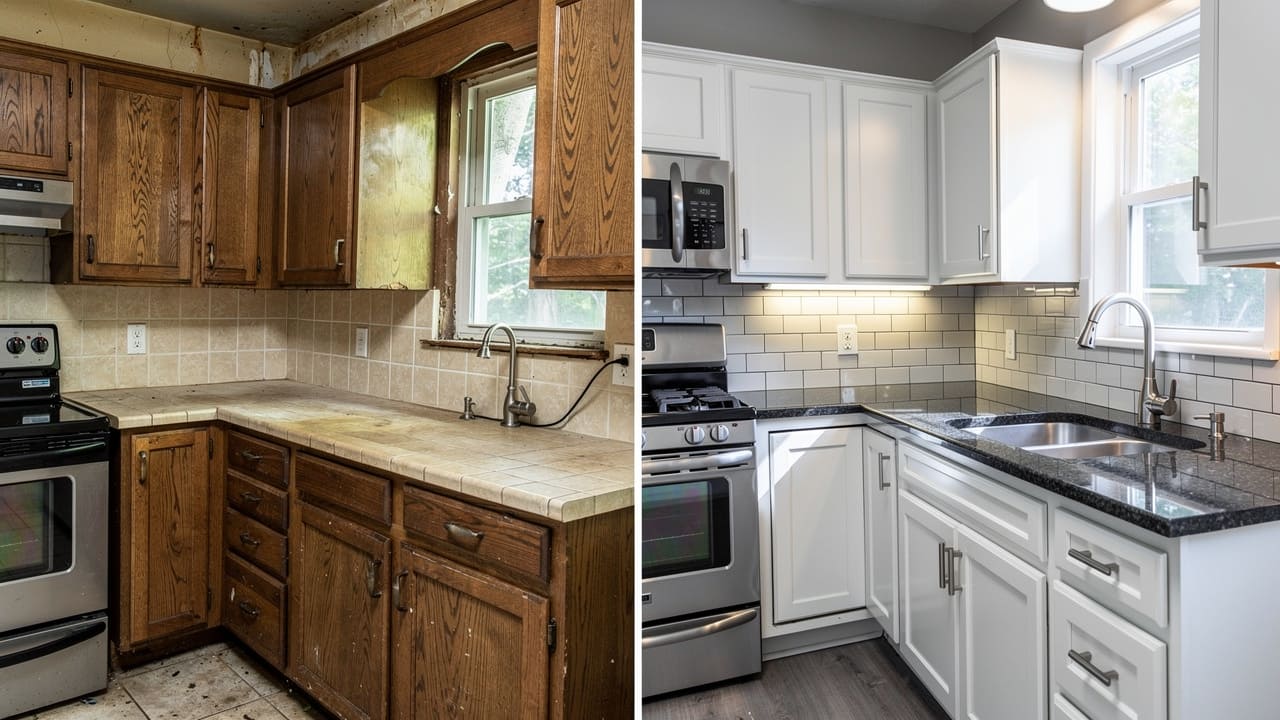

Trades and industrial businesses rely heavily on these three image types, so each deserves a tailored line of alt text rather than a generic label:
Renovation photos: “kitchen renovation before work began with outdated cabinets and worn countertops,” paired with “completed kitchen renovation featuring new custom cabinetry.”
Equipment shots: work best with model and context, like “heavy-duty excavator CAT 320 with extended boom attachment on site.”
Team photos: should name the role and activity shown, such as “project supervisor reviewing site plans on a commercial build.”
Infographics, Screenshots, and Maps
These secondary image types still need alt text, just summarized rather than literally described line by line.
An infographic might use “line graph showing a 45% increase in organic traffic over 12 months following a website redesign,” giving search engines the key data point.
A screenshot could read “dashboard view showing task assignments and project timeline.”
A service area map works well as “service area map covering downtown Edmonton within a 25-kilometre radius.”
Technical Setup and Common Mistakes to Avoid

Getting alt text right technically means making sure the alt attribute is actually present in your image HTML, written as <img src="image.jpg" alt="your description here">, and filled in every time an image gets uploaded. Most content management systems, including WordPress, include a dedicated alt text field in the media upload screen, so there’s rarely a technical barrier, just a habit that needs building.
The mistakes that undo good intentions are predictable once you know what to watch for:
Keyword stuffing, where a single alt tag tries to cram in every service and city a business operates in, reads unnaturally and can be flagged as manipulative by search engines.
Leaving the field blank entirely is just as common, and it means that image contributes nothing to your search visibility. On sites with 500 or more product and project images, this single gap can leave 40% or more of total image inventory completely unindexed for image search.
Relying entirely on automated, AI-generated alt text is another frequent issue, since these tools can identify that a photo shows “an outdoor construction site” without understanding it represents a completed commercial project worth highlighting.
Building a Consistent Alt Text Workflow
Scaling good alt text practice across hundreds of images takes a system, not good intentions alone.
Pair every alt tag with a descriptive filename, such as “steel-frame-roof-replacement-calgary.jpg” instead of a generic camera-generated name, since filenames reinforce the same SEO signal.
Assign one team member responsibility for reviewing alt text before any page goes live.
Run periodic audits using free tools like WAVE or Siteimprove to catch images that slipped through without a description.
Turning Alt Text into a Growth Strategy

Alt text works best as one piece of a larger SEO system rather than a one-time cleanup project, since its value compounds alongside page speed, content quality, and site structure. On its own, fixing alt text across a site is a low-cost, high-return task.
Combined with strong filenames, fast-loading images, and well-structured service pages, it becomes a genuine traffic channel built on content you’ve already created. Businesses spending $2,000 to $10,000 a month on marketing often find that fixing alt text and image filenames across a 200-page site takes less than a week yet keeps generating search visibility for years afterward.
A low-cost, high-return task on its own becomes a genuine traffic channel once it’s paired with strong filenames, fast-loading images, and well-structured service pages.
This is where having a strategic partner pays off for busy owners and operations leaders who don’t have time to audit a full image library themselves. Cutting Edge Digital Marketing builds this kind of detail into the website design, SEO, and tracking systems it creates for Alberta service, trades, and industrial businesses, so alt text optimization happens as part of a bigger plan rather than getting missed entirely.
The Takeaway
Alt text is one of the rare SEO tasks that costs almost nothing to fix yet keeps paying off as your site grows, since every new project photo becomes another chance to show up in search. The businesses that treat it seriously, writing specific, honest descriptions instead of generic labels, tend to see their image-heavy pages pull in more qualified traffic over time without any extra ad spend.
Start by auditing your highest-traffic pages for missing or vague alt text, then build a simple workflow so every new image gets a proper description before it goes live. If you’d rather have an experienced partner handle the full picture, from alt text to site speed to lead tracking, Cutting Edge Digital Marketing works with Alberta service and industrial businesses to build that system properly from the ground up. Get started with a full site image audit to see exactly where your biggest opportunities are hiding.
Frequently Asked Questions
How Long Should Alt Text Be?
Aim for roughly 8 to 20 words, or under 125 characters, so the description stays clear without getting cut off by screen readers. Longer isn’t better here. A short, specific sentence that names exactly what’s in the image works better than a lengthy caption-style description.
Does Every Image On My Website Need Alt Text?
Every meaningful image, one that adds information or context, needs descriptive alt text. Purely decorative images, like background graphics or dividers, should instead use an empty alt attribute (alt="") so screen readers skip past them without unnecessary noise.
Can I Use AI Tools to Generate Alt Text Automatically?
AI tools can speed up the first draft, but they often miss business-specific context, like recognizing a job site as a completed commercial project rather than just “outdoor construction.” Human review still matters for accuracy, especially for project photos tied to specific locations or clients.
Will Adding Alt Text Alone Improve My Google Ranking?
Alt text is one ranking signal among many, not a standalone fix. It works best combined with descriptive filenames, strong surrounding page content, fast page load speed, and a generally well-structured website.
How Do I Check If My Website Images Are Missing Alt Text?
Free tools like WAVE and Siteimprove can scan your site and flag images without alt text automatically. Google Search Console’s image search reports also show which images are generating impressions, helping you prioritize fixes on your highest-value service pages first.