

Picture this. A Calgary electrical contractor runs Google Ads and Facebook ads across all of Alberta. The phone rings a lot, which looks great on paper. But half the calls are from Lethbridge, Grande Prairie, or small towns three hours away that the crew will never drive to. The ad budget gets burned, the office is frustrated, and real local leads are buried in the noise.
Geo-targeting for paid ads fixes that problem. Instead of spraying ads everywhere, geo-targeting for paid ads focuses your spend on the exact cities, neighbourhoods, and industrial parks you actually serve. The same budget that once drove random clicks can now drive steady, profitable work in the areas that matter most to your business.
When geo-targeting is missing or set up poorly, owners usually see the same issues:
Lots of calls, but very few in the right locations
Staff wasting time screening leads from outside the service area
Reporting that makes campaigns look better than they really are
Most Alberta businesses do not use geo-targeting for paid ads properly, even though platforms like Google Ads, Meta Ads (Facebook and Instagram), and LinkedIn Ads have powerful tools ready to go. With the right setup, you can focus on homeowners in certain postal codes, project managers in specific industrial parks, or high‑value commercial areas where your best work comes from.
This article breaks down what geo-targeting for paid ads really is, how it compares to geofencing, the business benefits you can expect, and a simple framework you can follow to set up and tune your campaigns. By the end, you will see how a smart local strategy turns your ad budget into real leads and long-term revenue, not wasted clicks.
What Is Geo-Targeting For Paid Ads?

Geo-targeting for paid ads is a way of showing your ads only to people in specific locations. That location could be as broad as a province or as tight as a two‑kilometre radius around a job site. You can target cities like Calgary or Edmonton, certain neighbourhoods, postal codes, or industrial parks where your ideal customers work.
But strong geo-targeting for paid ads does more than pick a spot on a map. It starts with location, then adds filters such as age, income, interests, job titles, and online behaviour. That mix lets you focus your budget on the exact type of person you want in that area. You are not just saying “anyone in Edmonton”; you are saying “decision‑makers in Edmonton who are likely to need what we sell.”
For example, think about an Edmonton HVAC company heading into a heat wave. With geo-targeting for paid ads, that company can show air conditioning repair ads only to homeowners within its real service area, in older neighbourhoods where units are more likely to fail, and to people who have recently searched for home repair topics. The ads feel relevant, and the calls are from people the company can actually help.
On the technical side, ad platforms use a mix of signals to figure out where someone is, including:
IP address and Wi‑Fi network location
GPS data from mobile devices
Declared locations on user profiles
Recent location history, in some cases
You do not need to manage that data yourself. Your job is to tell the platform which areas matter and how tight you want your geo-targeting for paid ads to be.
This type of targeting is especially valuable for service, trades, construction, and industrial businesses in Alberta that work inside a defined footprint. When you combine local focus with the right audience filters, geo-targeting for paid ads gives you higher conversion rates, stronger lead quality, and a much better return on every dollar you spend.
“Don’t count the people you reach; reach the people who count.” — David Ogilvy
Geo-Targeting Vs. Geofencing: What’s The Difference?
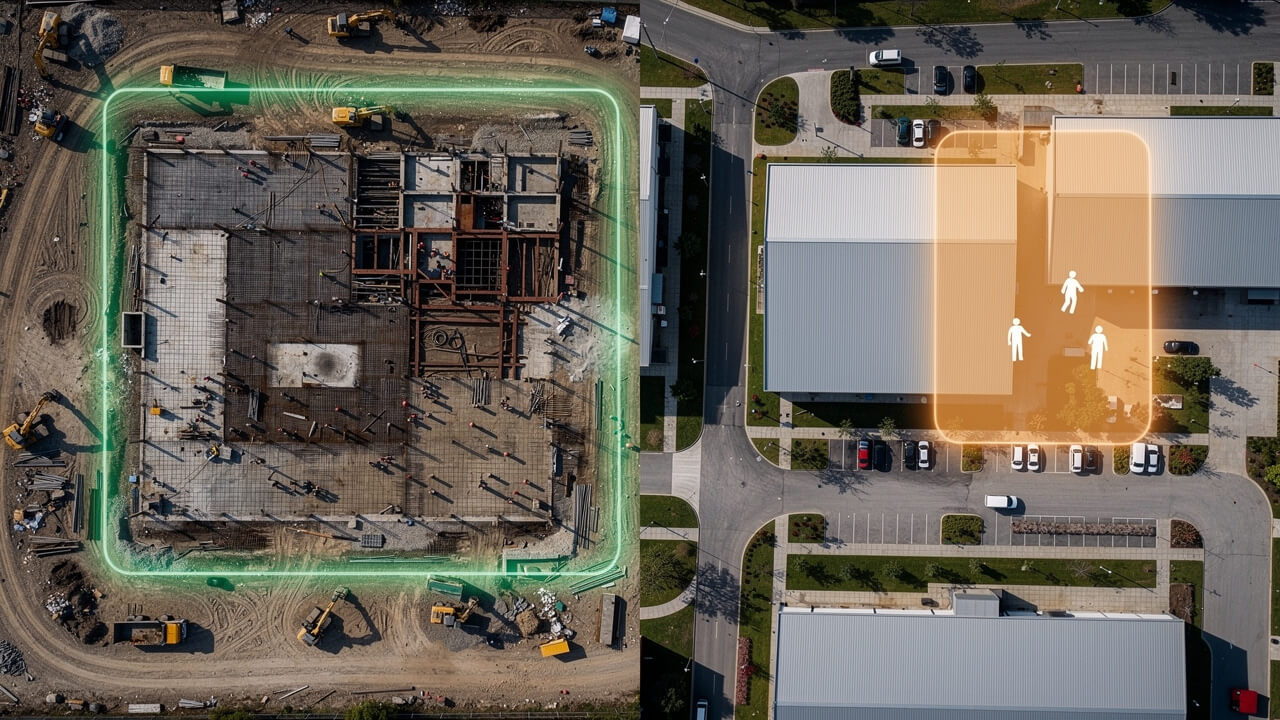
The terms geo-targeting and geofencing sound similar, and they do relate to location. But they work very differently and line up with different goals.
Geofencing creates a virtual boundary around a place. Anyone who steps inside that boundary can see your ads, no matter who they are. The only rule is “inside the fence.” For example, an equipment rental company in Red Deer could set up a geofence around a large construction site. Every worker who passes through that site might start seeing rental ads on their phone. This is broad awareness inside one tight physical area.
Geo-targeting for paid ads is more selective. It still starts with a location, but then it adds filters. You can narrow the audience by job title, interests, income level, or online behaviour. Instead of advertising to everyone on that Red Deer job site, geo-targeting for paid ads lets you focus only on site supervisors, project managers, or business owners in that area.
Here is an Alberta example. A commercial plumbing contractor wants ongoing maintenance work. With geo-targeting for paid ads, the contractor can show LinkedIn Ads to Facility Managers and Operations Directors who work in specific Edmonton industrial parks. The ads only reach likely decision‑makers, not every person who drives through the area.
To keep the difference straight, it helps to compare them side by side:
Geofencing
Based only on presence inside a defined area
Great for events, grand openings, or “everyone nearby” campaigns
Focused on reach and awareness
Geo-targeting for paid ads
Based on location plus audience filters
Ideal for ongoing lead generation and high‑value B2B or B2C work
Focused on qualified traffic and measurable revenue
So when should you use which? Geofencing makes sense when you want broad awareness near a venue, a grand opening, or a one‑time event. Geo-targeting for paid ads is the better choice when your goal is qualified leads and steady revenue. For most established service, trades, and industrial businesses in Alberta, geo-targeting for paid ads is the smarter, more profitable option.
The Business Benefits Of Geo-Targeting For Paid Ads

From a business owner’s point of view, the main question is simple. Does this make money and reduce waste? When you use geo-targeting for paid ads well, the answer is yes on both counts.
Here are five practical benefits you can expect.
Lower Wasted Ad Spend
The first major benefit is the way geo-targeting for paid ads cuts wasted spend. Every click from outside your service area is money you will never recover. By locking your campaigns to real service zones and excluding the rest, you stop paying for calls you cannot service. That change alone can bring down cost‑per‑click and cost‑per‑lead in a noticeable way.
Higher Lead Quality
A second benefit is higher lead quality. When you point geo-targeting for paid ads at specific postal codes, neighbourhoods, or industrial parks that match your ideal jobs, you filter out poor fits before they ever see your ad. An electrical contractor can focus on newer suburbs with higher‑value projects, while an industrial cleaner can focus on heavy industrial zones along the QEII. Your sales team spends more time with the right prospects and less time saying “sorry, we do not go there.”
Stronger Ad Relevance And Engagement
The third benefit is stronger ad relevance and engagement. Local language matters. An ad that says “Serving Fort McMurray Oil Sands Sites” or “Calgary’s Reliable Hail Damage Roof Repair” grabs attention much faster than a generic headline. Because geo-targeting for paid ads lets you run different messages in different pockets, you can speak directly to each area’s weather, housing style, or industry mix. That local touch drives higher click‑through rates and better response.
Stronger Local Presence
Another benefit is the way geo-targeting for paid ads builds local authority. When people keep seeing your name in local searches and social feeds, in connection with their city or industrial park, they start to view your business as the “go‑to” option in that area. Over time, this repeat exposure supports word‑of‑mouth, repeat work, and stronger pricing power.
Competitive Edge In Key Areas
A final benefit is competitive edge. With geo-targeting for paid ads, you can focus on growth pockets your competitors ignore, or run ads near a competitor’s office to present an alternative choice. When these tactics sit on top of clear tracking, they help you quietly pick up market share in the best local zones.
Cutting Edge Digital Marketing builds paid strategies around these benefits, with geo-targeting for paid ads at the centre. The goal is simple: more qualified local leads, less waste, and clear numbers to back up every decision.
“The man who stops advertising to save money is like the man who stops the clock to save time.” — Commonly attributed to Henry Ford
How To Set Up And Optimize Geo-Targeted Paid Ad Campaigns
Define Your Service Areas And Exclusion Zones

Before touching Google Ads, Meta, or LinkedIn, take time to map where you really want work. Think in plain business terms. Where do you make the best margins, respond the fastest, and want more of the same projects? Those places form your primary service area. Areas that are farther out, or only make sense for bigger jobs, become your secondary service area.
A simple way to clarify this is to ask:
Which cities or postal codes do we love getting calls from?
Where do travel time and fuel costs start to hurt our margins?
Are there locations we only serve for emergency or large‑ticket jobs?
Which neighbourhoods or industrial parks have the kind of clients we want more of?
Next, use the tools inside each platform to match that map. You can draw a radius around your office, target specific cities, or choose postal codes one by one. For B2B work, it often makes sense to draw custom shapes around industrial zones such as Acheson Industrial Area, Nisku, or parts of southeast Calgary where many yards and shops sit.
Just as important, set clear exclusion zones. If certain towns, neighbourhoods, or postal codes often send low‑value or price‑driven leads, remove them from your geo-targeting for paid ads. Protecting your budget from the wrong areas is a big part of making the right areas work harder.
If you prefer not to manage maps and exclusions yourself, a specialist team like Cutting Edge Digital Marketing can build and maintain these geo-targeting rules for you, based on your real‑world job data and margin goals.
Layer Audiences, Craft Local Ad Copy, And Track Performance

Once your map is in place, refine who sees your ads inside those areas.
On Google Ads, you can:
Combine geo-targeting for paid ads with radius and postal code filters
Use settings that focus on people who are physically in your locations, not just “interested” in them
Adjust bids for high‑value pockets, such as specific postal codes or suburbs
On Meta Ads (Facebook and Instagram), you can:
Take city or postal code targeting and add filters such as homeowner status or recent movers
Layer interests related to renovation, landscaping, or construction
Exclude broad audiences that bring in lots of clicks but very few real leads
On LinkedIn Ads, you can:
Combine location with job titles, industries, and company size
Focus on Facility Managers, Operations Directors, or Procurement roles in specific industrial parks
Run account‑based campaigns around target companies within your chosen zones
After that, match your message to each local pocket. Geo-targeting for paid ads works best when your copy calls out the area directly. “Protecting Calgary Homes From Freeze‑Thaw Foundation Cracks” feels far more real than a generic service line. Mention the city, quadrant, or industrial park so people instantly know you work where they live or operate.
Finally, keep an eye on the numbers. Use each platform’s location reports to see which cities, postal codes, or radiuses give you the best cost‑per‑lead and conversion rates. With that insight, you can:
Move more budget into the pockets that work
Trim or pause locations that waste spend
Test new nearby areas once core zones are profitable
This steady tuning is where a partner like Cutting Edge Digital Marketing adds strong value, by managing geo-targeting for paid ads across Google Ads, Meta Ads, and LinkedIn Ads and tying results back to actual revenue and job types, not just clicks.
Conclusion
For Alberta service, trades, construction, and industrial businesses, geo-targeting for paid ads is not just a nice‑to‑have setting. It is a practical way to stop wasting budget, focus on the right local markets, and drive more qualified work to the field. When you clearly define service areas, add smart audience filters, write local‑specific copy, and keep tracking performance, geo-targeting for paid ads becomes a steady growth engine.
If you want that level of control without managing it yourself, Cutting Edge Digital Marketing can help. Our team plans, runs, and refines geo-targeting for paid ads for Alberta and Western Canada businesses, so your marketing spend turns into real leads, not random clicks. Reach out to discuss your service areas and growth goals, and see how a focused local ad strategy can support your next stage of expansion.
FAQs
What Is The Difference Between Geo-Targeting And Geofencing In Paid Ads?
Geo-targeting for paid ads starts with a location, then adds filters such as demographics, job titles, and interests so your ads reach a pre‑qualified audience in that area. Geofencing simply shows ads to anyone inside a virtual boundary, based only on physical presence. For most Alberta businesses that care about lead quality and return on ad spend, geo-targeting for paid ads is the stronger and more efficient choice.
How Much Does Geo-Targeting Cost For Paid Ads In Canada?
Geo-targeting for paid ads is a standard feature in platforms like Google Ads, Meta Ads, and LinkedIn Ads, so there is no extra fee just to use it. Your total cost comes from your daily or monthly budget, the level of competition in your chosen locations, and how you bid for clicks and leads. When geo-targeting for paid ads is set up well, it usually lowers your cost per qualified lead because you stop paying for traffic from areas you do not serve.
Does Geo-Targeting Work For Small Budgets?
Yes. In many cases, smaller budgets benefit the most from precise geo-targeting for paid ads. By focusing on only a few high‑value neighbourhoods or industrial parks instead of an entire city, you concentrate your impressions where they are most likely to turn into booked jobs. For a smaller contractor, that can be the difference between a scattered trickle of calls and a steady, predictable pipeline.
What Are Common Mistakes To Avoid With Geo-Targeting For Paid Ads?
Frequent mistakes include setting service areas too wide, forgetting to add exclusion zones, relying only on radius targeting around an office, and writing generic ad copy that does not mention local details. Another mistake is “set and forget” campaigns that never review location reports. Regularly checking which postal codes and cities drive real leads helps you keep geo-targeting sharp and your budget working as hard as possible.